Block Calls will block all unwanted incoming calls on your phone. You can maintain a blacklist of numbers that will never ring. When a caller on blacklist calls you, his call will be immediately rejected. You can add members to your blacklist in two different ways:
• By selecting numbers from the address book
• By typing in the number of the unwanted caller
Never get disturbed by an unwanted caller or obnoxious marketer. Add these unwanted callers’ numbers to your blacklist and forget about having to deal with unwanted calls! You can also enable or disable the blacklist blocking service depending on when you want to take all calls.
How to Configure
After downloading and installing the application, run it from the menu. You will find the application icon in your “Downloads” folder. Start the application by clicking the icon and enter the registration key sent to you in the email. Add a few numbers to the black list and enable the service.
Cricket has always been a Vogue for Cricket lovers, after IPL the season of world Cup T20’s Round is to over and the news are filled with cricket updates and sensational stories about players and teams are rumoring around, Tech bytes thought to enjoy the season with its readers Cricket love.
As world Cup t20 starts many of the blogs come up with very conventional things to amuse their readers, let me introduce you with Cricket World Championship 20 for iPhone, iPad and iPod touch. As every one is trying to get the same hype players are having developers did their best to launch so many applications for the cricket season among which the best rated game for iPhone, iPad and iPod touch is introduced at MAS.
It’s a total batting game and sticks user to keep on playing for hours because of its unique features that others fail to introduce I keep on playing it for hours and get my records on top at Facebook and others challenge me for playing it’s a social network like twitter, Facebook and other social sites.
Here are the details about Cricket World Championship 20:
Its unique and Friendly interface provides fantastic platform to play, here are some of the screen shots I took from i-tunes store and its official site. Facebook Integration:
iPhone cricket app has Facebook integrated in it and maintains a list of world’s top players. Share your half-centuries, centuries, and wins with your friends with simple steps. Play the game as often as you can and keep wining matches to claim points and an entry in to the world’s top players list. How to play Cricket Championship 20:
- Select your team and your opponents.
- Once the game starts, touch the screen to begin play. The bowler will then throw the ball.
- Three arrows come up, indicating a shot on the leg side, off side or straight. Choose which you want to play and press the corresponding arrow.
- Time your shot properly to make the maximum score.
- After playing every ball, wait (don’t say some time, say how long. 1 second? Longer? Shorter?) X seconds for the bowler to get ready to ball again. Then, touch the screen again and play as you did before.
- If you manage to chase the total successfully, within your twenty overs, you win the match!
How scoring and world ranking works:
Every run scored, every boundary hit and every match won will count towards your world ranking. Register yourself with Pepper.pk to post and view world rankings.
- For every match you play, you get 20 points.
- For every half century you score, you get 50 points.
- For every century you hit, you get 100 points.
- For every double century you smash, you get 200 points.
- For every match you win, you get 100 points plus the runs you chased as bonus points.
- For every match that ends up in a draw, you get 20 points.
- Keep in mind you do not get any points, if you lose a match. So, play to win. iTunes Store Download Link Devlopers Link
Posted by
joji
Wednesday, June 2, 2010
at
10:31 PM
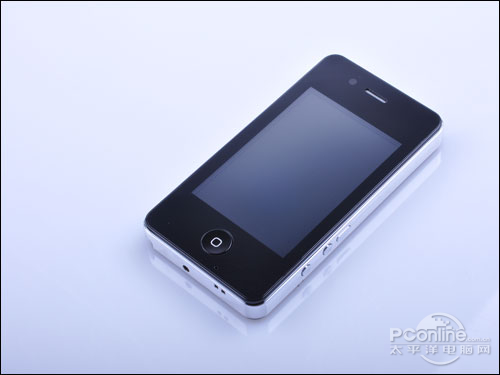
When the first images of the next generation iPhone were released in April, the first reaction of many readers was that it must be a iPhone counterfeit or clone from China. As more details emerged, it became clear that the leaked phone was definitely an Apple prototype and ultimately returned to Apple.
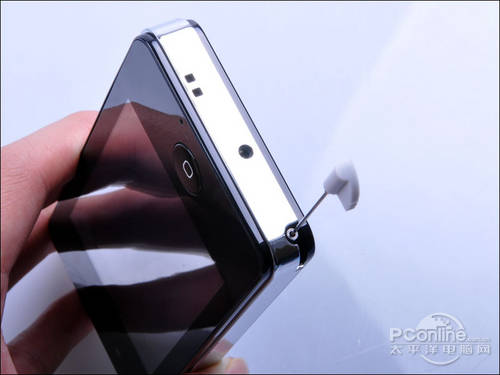
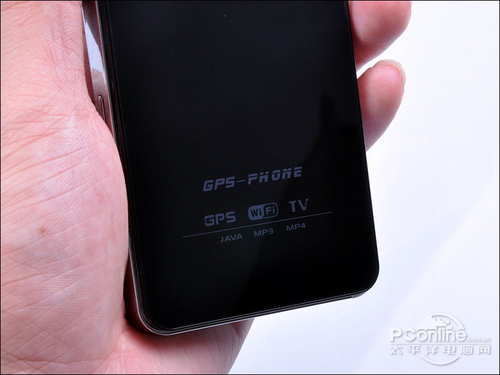
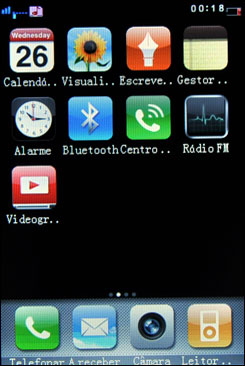
Based on the numerous leaks, the real Chinese counterfeiters have had time to ramp up their efforts and create this 4th generation iPhone clone. This one's officially called "GPS-PHONE" accoding to PCOnline.com.cn and offers a number of features including a front facing camera, a TV antenna, mini USB interface, and camera flash.
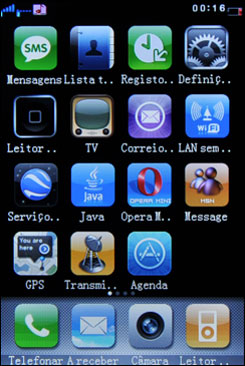
The device even comes with its own iPhone-like interface and supports installation of Java apps.
We are not sure if this is a bug or a feature but if you try to push the power/sleep button for three times in a row on the lockscreen, the iPhone goes right into flashlight mode showing bright white screen. I have also tested this and it appears to be working on iPhone OS 4 Beta 4.
Could this be one of those useful little things like “Screenshot Capture” in iPhone which Apple is so good at implementing? Most likely yes. What do you think?
These days, practically everyone has a busy, and complex lifestyle. Things for iPhone/iPod Touch is here to make life a little bit easier by keeping track of what you have to do. With this app, you’ll never forget another task again. However, it is quite expensive, at $9.99 ($19.99 for the iPad version). Is it worth it? Watch our video review below to find out!
NOTE: There’s even an iPad version of this app, at double the price ($19.99). Overall, this is a great app, but expensive, and hence, reflects upon our rating.
I remember when Skype was first released for iPhone. I was at breakfast with some friends, and we all were trying it out, only to realize that we could not make calls on 3G. This was of course a big disappointment, but we still found it pretty wild that we could call each other for free, even if it was just over Wifi.
As a person who worked for years in a large telecommunications company, I can share an inside secret with you. A lot of these large corporations who depend on the mobile market, are all very concerned with the proliferation of VOIP technology. If you are not familiar, VOIP stands for Voice Over IP, or the ability to transfer your voice via the Web as opposed to land or cellular lines.
If the predictions are accurate, and VOIP is going to dominate the market over the next few years, this can drastically change the mobile market, as well as many other industries. For starters, this will lower prices, as VOIP calling is generally much more affordable than regular calling. Another consequence of the VOIP trend, which occurred to me recently, would be the reduction of the mobile radiation risks we hear so much about. The way radiation works is, the harder the phone has to work to communicate with the cell towers, the more radiation it emits. If phones only had to communicate with the internet and not cell towers, that would completely change the picture. Meanwhile, I use tawkon to avoid radiation from my BlackBerry. (hope it gets approved soon for iPhone too.)
When it comes to VOIP technology, the most well known name and the industry leader is Skype. Skype has the widest user base out of all the VOIP providers, and so when the iPhone app was announced, it was a big deal. However, as of two days ago, Skype 2.0 is out and it now supports 3G. What this means is that you can now make calls from your iPhone to Skype for free from anywhere.
With the new iPhone 4.0 OS coming out next month, the ability to run Skype in the background means iPhone users are now able to be reached for free on their phones via Skype. I have not tried it out yet, but all initial reviews claim that the voice quality is very on par with regular calls.
As of now, Skype calling over 3G is free to Skype and available at the reduced Skype rates if you are calling a phone. As of the end of August, according to the app’s page on iTunes, there will be a small monthly fee for the service.
For the record, VOIP calling is available on other platforms as well with the Fring Android app and the Nimbuzz BlackBerry app.
The release of the new Skype for iPhone also offers some other new features or should I call them “enhancements”. These include faster startup time, fast access to the Skype dial pad from the phone’s home screen, and others.
We will wait to see what this service will cost, but whatever the case may be, the ability to use VOIP on your mobile phone whenever and wherever, is a definite step in the right direction, and one that might change this multi billion Dollar industry forever.
Yes! Its that time time of the year again! Apple is now offering an exciting “Back to School” offer for students and faculty. You can now buy a new Mac for your college or school and you’ll get an 8GB iPod touch worth US $199 for free.
If you’re a college student or a faculty or staff member at any grade level and you buy a new Mac with Apple education pricing from May 25 through September 7, 2010, you can get a free 8GB iPod touch.* No wonder they call these the best years of your life.
But there is this little catch, the discount is in the form of a mail-in rebate. So to qualify, you’re going to pay for the extra $199 for the iPod touch when you buy a new Mac but you’ll get your money back within 90 days. Also, the products must be purchased through Apple Online Store for Education, or authorized Apple Campus Stores.
If you are eligible, you can simply head over to Apple Education Store site here, select your school or college, and make your purchase! [via The Readers Eye]